

WTN Account Security Checklist
Accounts get lost in boring ways: a password reused from a breached site, a PGP key that lived on one laptop and died with it, a login on a clone page that looked right. This checklist is built around those failures. Eight items, each linked to the section that explains it:
- A username and password you have never used anywhere else
- A password manager, not your memory
- A PGP key with its own passphrase, an offline backup, and a revocation certificate
- PGP 2FA switched on and tested before you deposit
- An address check before every login
- A clean browsing environment
- Short sessions that end with a logout
- A plan for the day something looks wrong
A printable version sits at the bottom of the page. Setup steps for PGP itself, such as installing GnuPG and generating a key, live in the PGP encryption guide. This page does not repeat them.
Unique Username and Password
Tor hides your IP address. It does nothing about the password you chose. If the same password protects a forum account that leaked in 2019, an attacker who has that dump can try it on WTN in seconds, over Tor like anyone else.
- Password: not used on any other site, ever. Length beats cleverness. The current NIST guidance on passwords favors long secrets over forced symbols and says to screen against known-breached passwords.
- Username: not a handle you use elsewhere, and nothing that points back to you. A name that appears on your clearnet accounts links the two.
- Reuse test: if you would be unhappy to learn that a stranger tried this exact password on your email, it is already too close to something you use.
Use a Password Manager
A secret you can memorize is a secret you will reuse. Put the WTN password in an offline manager such as KeePassXC, which keeps an encrypted file on your own disk instead of a cloud account. Tails ships with KeePassXC too, and you can keep the database in Persistent Storage. See the Tails guide.
Let the manager generate the password. For the one secret you must remember, the master passphrase, use several random words. The EFF's dice-based passphrase method gives you a way to pick them without trusting your own taste. Five or six words like cabbage unkempt oxidant stylist grafted is the shape you want. Do not use that example.
Protect the PGP Key Itself
PGP 2FA is only as strong as the private key behind it. The PGP guide shows how to generate the key and export a backup. Three habits matter more than the commands.
Give the key its own passphrase. If the key passphrase equals the account password, one leak hands over both factors. The two secrets should have nothing in common.
Keep the backup offline. An encrypted USB drive in a place you control, not cloud sync, not an email draft. Test that you can actually restore from it once. A backup you never tried is a guess.

Make a revocation certificate now. GnuPG can generate one while you still hold the key:
gpg --output revoke.asc --gen-revoke YOUR_KEY_IDStore it next to the backup. If the key is ever stolen, the certificate lets you declare it invalid. It does not replace the key you uploaded to the market. Check how WTN handles a key change before you need it, not during an emergency.
If you lose both the private key and its backup, assume you are locked out. This site is an independent reference and cannot reset a market account for you.
Turn On PGP 2FA and Test It First
Two-factor login adds an encrypted challenge after your password. You decrypt it locally with the
private key, so a stolen password alone does not open the account. The setup is covered step by step
in the PGP guide: upload your public key, compare the fingerprint the market shows with
gpg --fingerprint YOUR_KEY_ID, then enable 2FA.
The order matters. Enable 2FA only after the fingerprints match, log out, and log in once to prove the full loop works. Do that before the account holds any money. People who skip the test find out the key block was pasted with a typo on the day they need to withdraw. If decryption fails, fix the key upload. Do not turn 2FA off to get in, because a funded account on password-only login is the weakest state you can be in.
Check the Address Before Every Login
Credentials stolen on a clone page bypass everything above. A clone can show the same layout, the same security check, and even a believable address panel. So build one habit: open WTN only from your Tor Browser bookmark, and compare the address with the verified links whenever you add or change a bookmark.
For a stronger check, verify the PGP-signed URL announcement, as described in the PGP guide. A clone cannot forge that signature. The captcha guide explains the security check and the official address panel on the login screen. If the link will not load, go through the troubleshooting guide instead of searching for a replacement.
Keep the Environment Clean
A compromised machine defeats every setting on this page, because malware can read the passphrase as you type it. Two realistic setups reduce the exposure.
The first is a dedicated Tor Browser profile used for nothing else, set to the Safest security level and kept updated. The Tor Browser guide explains why mixing market sessions with ordinary browsing is a mistake. The second is Tails, which starts from a clean state on each boot.
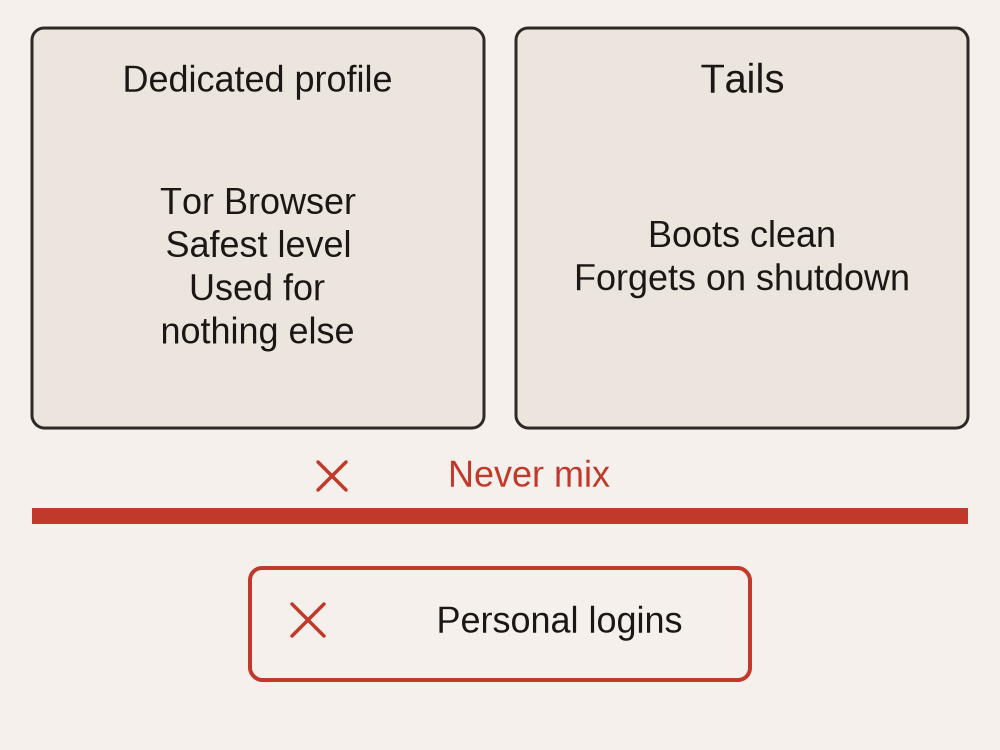
Whichever you choose, keep personal accounts out of that session. If you log into your clearnet email in the same window, you have tied two identities together on purpose.
Short Sessions, Clean Exits
Sessions expire, as the Tor Browser guide on this site notes, so do the account work in one sitting: log in, finish what you came for, log out. A tab left open overnight on a shared or unlocked computer is a standing invitation.
When you are done, use New Identity in Tor Browser. It closes your tabs and clears session state, so nothing from the market stays in the browser. On Tails, shutting down does the same job. This site cannot tell you exactly how long a WTN session lasts, so do not rely on it expiring on its own.
If Something Looks Wrong
Warning signs: your password stops working, you are logged out unexpectedly, orders or messages appear that you did not create, or the balance changes without your action. One of these is enough to act.
- Stop using the session. Close Tor Browser. Do not keep poking at the account from the same environment.
- Move to a clean environment, ideally a fresh Tails boot, and open WTN from a verified link.
- Change the password and, if the key or the machine may be exposed, replace the PGP key as well.
- Review history. Check recent logins, messages, and order activity for anything you do not recognize.
- Change the password anywhere else you used it. That should be nowhere, but check.
- Report a clone. If you reached the account through a link that is not on the verified list, send it through the contact page.
Do not wait to see whether it "settles down." Clone-site captures are sold and used fast.
Printable Checklist
Tick through it once at setup and again every few months.
What to Do Next
With the account locked down, look at the money side: the Monero privacy guide covers moving funds from an exchange to your wallet to the market without tying your identity to the deposit.
More: all guides · security on the homepage · WTN forum · report a bad link