

WTN Link Not Working: What to Check, in Order
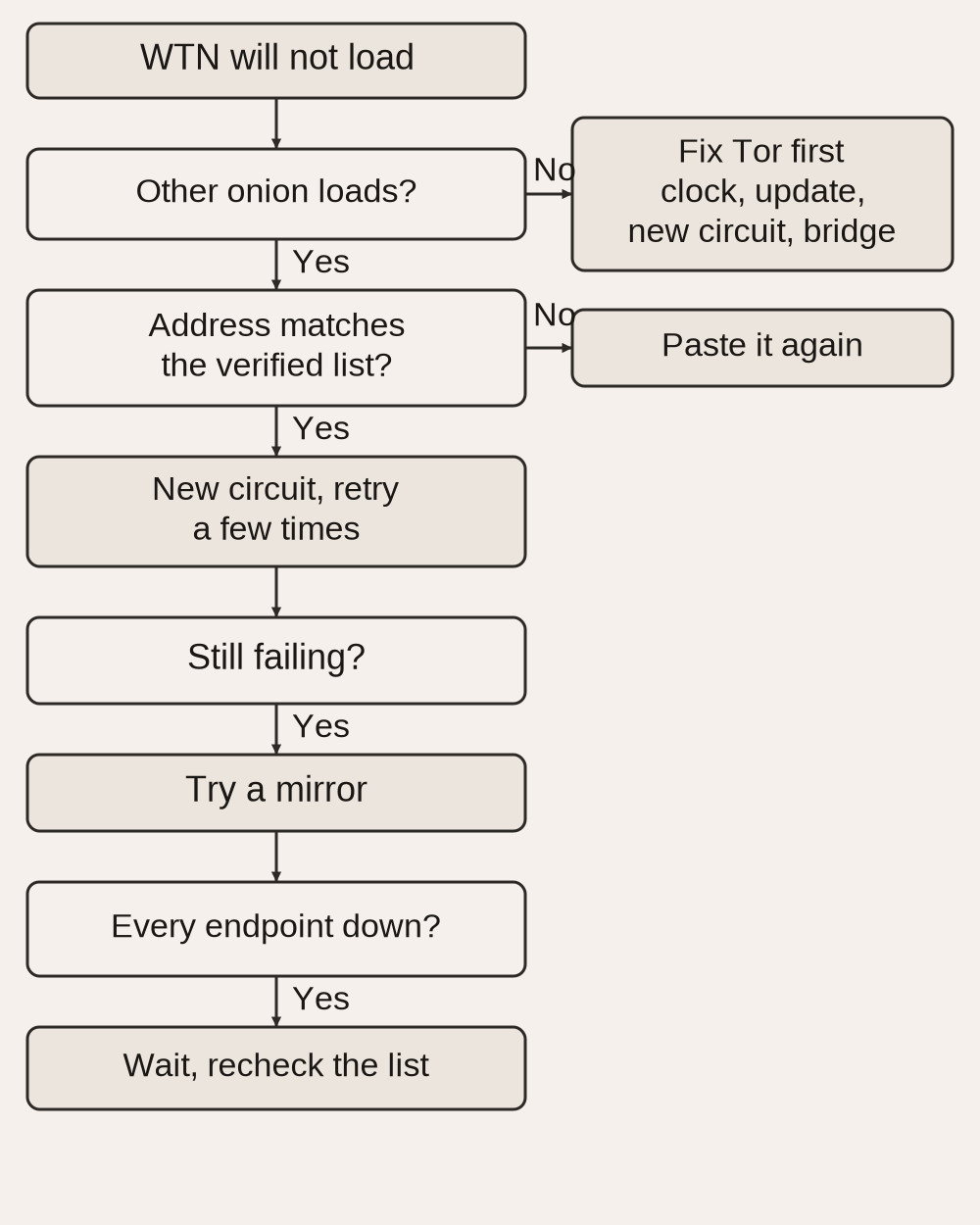
Most "WTN is down" reports come down to one of five things. Run them in this order and stop at the first one that fixes it:
- Does any other onion site load in the same Tor Browser window?
- Is Tor Browser up to date, and is your computer's clock right?
- Does the address you pasted match the verified list exactly?
- Does a fresh circuit change anything?
- Does a mirror from the verified list load?
The rest of this page explains each check, what the error screens mean, and what to do when everything really is down. One rule runs through all of it: while you are troubleshooting, never pick up a replacement link from anywhere except the verified links section. Outages are when clones get the most traffic.
First, Is It Tor or Is It WTN?
You need one data point before you touch anything else: can your Tor Browser load a different onion site right now? The easiest test needs no extra link. Open torproject.org in Tor Browser. The site advertises its own onion address, and Tor Browser shows an .onion available button in the address bar. Click it. If the Tor Project's onion loads, your Tor connection works.
Two outcomes. If the other onion also fails or crawls, the problem is on your side, so go to the next section. If it loads fine and only WTN fails, skip ahead to the address check and then the mirrors.
Do this before you retry WTN twenty times. Hammering a link that cannot load only tells you that it still cannot load.
Fixing the Tor Side
Work through these in order. Each one takes under a minute.
Check the clock
Tor builds circuits using signed network documents that are only valid for a window of time. If your system clock is off by hours, Tor cannot validate them and the connection stalls or never finishes. This one catches people on freshly installed virtual machines and Tails sessions with a dead clock battery. Set the time and time zone correctly, restart Tor Browser, and retry.
Update Tor Browser
Old builds break in quiet ways. Update through the browser's own update prompt, or download the current build from torproject.org/download and nowhere else. The Tor Browser guide covers the download checks.
Ask for a new circuit
If you reach other onions but WTN stalls, the circuit to it may be a bad one. Tor Browser lets you build a fresh circuit for the current site from the connection icon in the address bar, or reset everything with New Identity from the menu. New Identity closes your tabs and clears session state, so finish whatever else you were doing first. The Tor Project's circuit display documentation shows where the buttons are.
Use a bridge if Tor itself will not connect
If the progress bar never gets to 100 percent on launch, a direct connection to Tor may be blocked on your network. Open the connection settings and add a bridge. The Tor Project's censorship circumvention guide explains the options, and the Tor Browser guide on this site has the short version. If Tor connects but WTN still will not load, a bridge is not the fix.
Check the Address, One Character at a Time
A wrong address and a dead service produce screens that look almost the same. A v3 onion address is
56 characters of letters and digits before .onion. Drop one, swap two, or paste a
trailing space, and Tor will try to find a service that does not exist.
What goes wrong most often:
- Truncated paste. A chat app or terminal cut the line. Count the characters.
- Hand-typed prefix. Paste the address exactly as the verified list shows it. A prefix you add yourself, such as the wrong protocol, gives a connection error that reads like an outage.
- Impossible characters. Onion addresses use only the letters a to z and the digits 2 to 7. A 0, 1, 8, or 9 means the address is wrong, not that the site is slow.
- Old bookmark. Mirrors rotate. A bookmark from months ago may point at an address that was retired. Compare it with the current list.
The fix is the same each time: go back to verified links, copy the address fresh, paste it, and compare the first six and last six characters with the source before you press Enter.
If the address you pasted differs from the verified list by even one character, it is not a slow mirror. Close it.
What the Error Screens Are Telling You
Tor Browser replaces the generic "server not found" page with specific onion errors. The wording varies a little between versions, but these are the common ones and what to do about each. The Tor Project's onion services documentation has more background.
- Onionsite Not Found
- Tor could not find the service's descriptor. Usually that means the address is wrong, or the service is offline at the moment. Re-check the address, then try a mirror.
- Onionsite Has Disconnected / Circuit Timed Out
- The service exists but the connection broke part way, or the circuit never completed. This is the one to retry. Request a new circuit and try again, then move to a mirror if it repeats.
- Invalid Onionsite Address
- The string is malformed. This is a typo or truncation, never an outage. Paste it again from the verified list.
- Page loads but looks wrong
- Stop. Check the address against the verified list and the panel on the security check page. A page that loads but does not match is more dangerous than one that does not load.
When to Switch to a Mirror
The verified links section lists a primary address and two mirrors. According to that section, the mirrors point at the same backend, so your login, wallet, and orders are the same on all three. You are not switching sites, only the door you walk through.
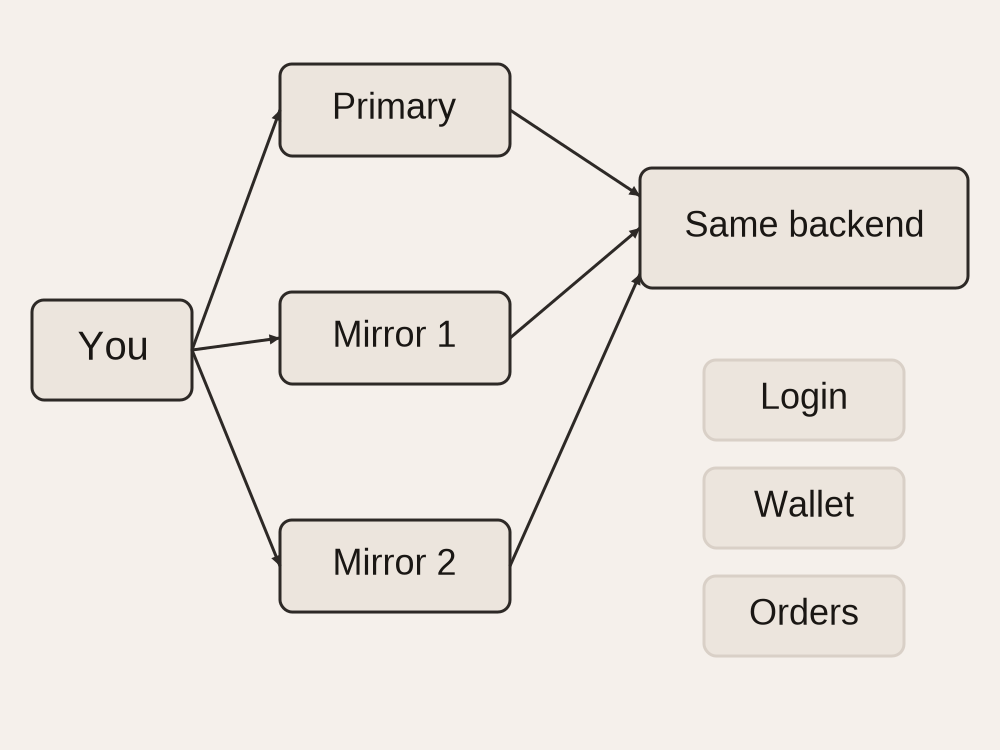
Switch when the primary has failed several times with a fresh circuit between attempts, and another onion loads fine. Do not switch on the first timeout. Tor adds latency, and one slow attempt is normal.
Before you enter anything on a mirror, check its address against the verified list and against the PGP-signed announcement if you can. The PGP guide shows how. This page does not repeat the addresses on purpose. One list in one place means no stale copy can mislead you, so open verified links or the mirror status section for the current ones.
When Every Endpoint Fails
If another onion loads in the same window and the primary and both mirrors fail after fresh circuits, the service is probably having a bad hour. Hidden services restart, relays get congested, and a full outage is rare but not unheard of.
Do nothing clever. The FAQ on the homepage says outages on the Tor network usually clear within a few hours and suggests checking back after 24 hours if one persists. Follow that. Close the tab, check the verified links section again later, and keep your own bookmark until a fresh signed list says otherwise.
The forum's uptime thread is another signal, but only if you can already reach the forum. If the market is unreachable, so is the forum, because they share an address.
Why Outages Are Clone Season
When the real link fails, people go looking. That search is what phishing operators are waiting for. Someone posts "new working link" in a chat, a search ad promises "WTN mirror, working now," a throwaway account answers your question with an address. Every one of those can lead to a page that copies the login screen and records what you type.

A clone can copy the captcha too, so a login page that looks right proves nothing. What it cannot copy is the PGP signature on the official URL list. If you cannot verify an address, do not use it, however urgent the order feels.
Seen a link circulating that is not on the verified list? Send it through the contact page. Reports like that help keep the list clean.
Link Troubleshooting FAQ
- Why does the WTN onion link time out?
- Timeouts come from three places: a weak Tor connection on your side, a mistyped address, or a temporary problem on the service side. Test another onion site first, then re-paste the address, then try a mirror.
- How many times should I retry before using a mirror?
- A few attempts with a fresh circuit between them is enough. If the primary still fails while other onion sites load, switch to a mirror from the verified list.
- Do the mirrors share my account and wallet?
- According to the verified links section of this site, the mirrors point at the same backend, so your login, wallet, and orders are the same. Confirm the mirror address against the verified list before you enter credentials.
- What should I do if all WTN links are down?
- Confirm that other onion sites load in your Tor Browser, wait a few hours, and recheck the verified list. Do not search for replacement links through social media or search engines, because that is where phishing clones appear.
What to Do Next
Once a page loads and the address checks out, you will hit the security check. The captcha guide explains how to read it. If Tor itself is the recurring problem, go back through the Tor Browser setup.
More: all guides · access steps · WTN forum · report a bad link